
SPLIT TUNNELING · ONE CONNECTION, YOUR OWN ROUTES
Split tunneling: connect once, route traffic wherever you want
Connect to a single VPN location and let rules decide the rest. Russian sites can leave from your Frankfurt VPN, European ones from New York, and your work network can skip the VPN entirely — all at once, from one connection.
- Entry VPNThe one location you connect through
- Traffic routesEach rule sends its traffic to a location of your choice
- OthersEverything no rule matches
How the routing works
- One entry, many exitsYou pick an entry VPN — the location your device actually connects to. Every rule you add then says where that kind of traffic should leave from: another VPN you own, or Direct, meaning straight to the internet without the VPN.
- Rules are ordered, first match winsRoutes are checked from top to bottom and the first match decides. Order matters because regions overlap: Europe includes Russia, so a separate Russia rule has to sit above the Europe rule to take effect. You can move any rule up or down.
- Country presets built from real networksEach country preset is a list of registered IPv4 and IPv6 network prefixes — Albania is 333 prefixes, Armenia 252, Angola 187. Search by country, region or preset name. Registration data reflects who owns a network, which may differ from where a site is physically hosted.
- Your own presetsNeed something the country list does not cover? Create a preset with your own networks in CIDR form and domain names, one per line, up to 4096 entries — an office subnet, a set of work domains, a service you always want on a particular location.
How it looks in the app
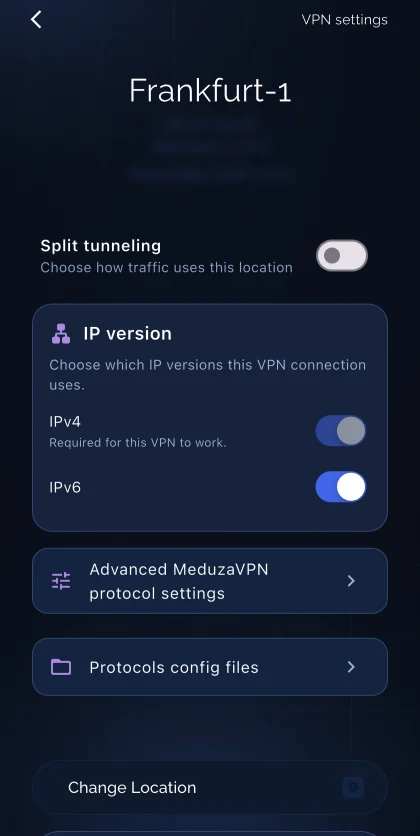 Split tunneling lives in each VPN's settings — switch it on to choose how traffic uses this location.
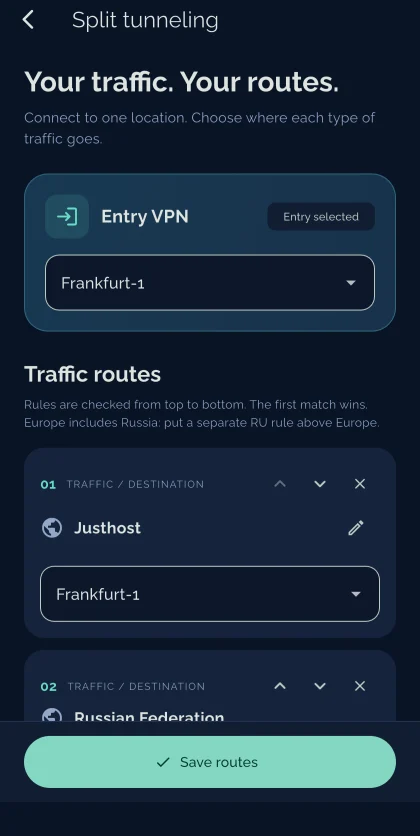 Choose the entry VPN, then add routes. Each one shows its traffic and where that traffic goes.
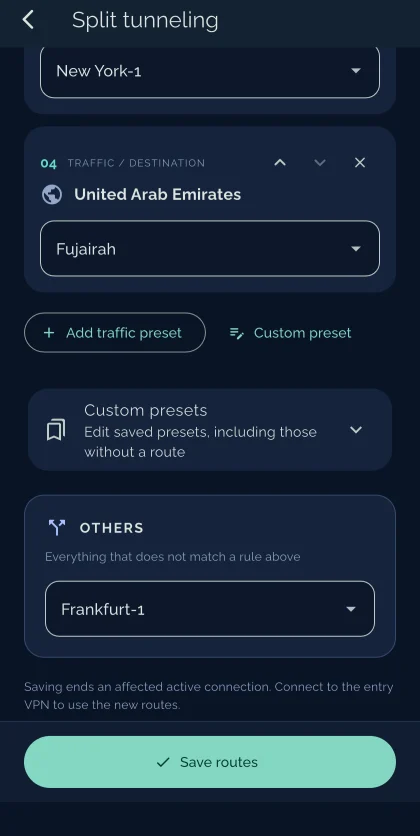 “Others” decides everything no rule matched, so nothing leaves the tunnel by accident.
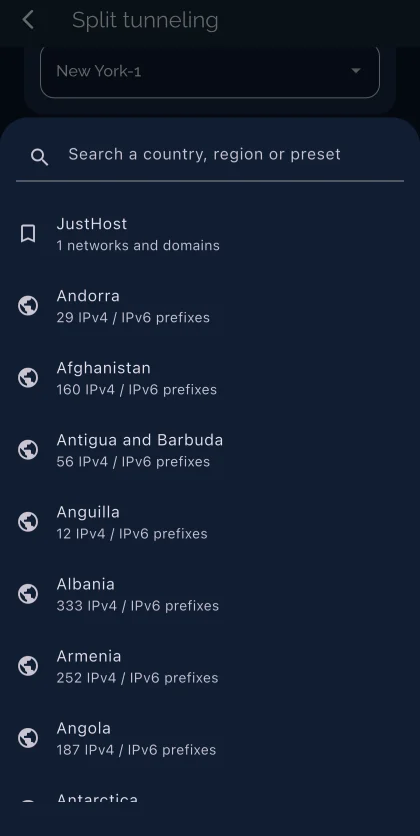 Pick a country or region preset — each one carries the registered network prefixes behind it.
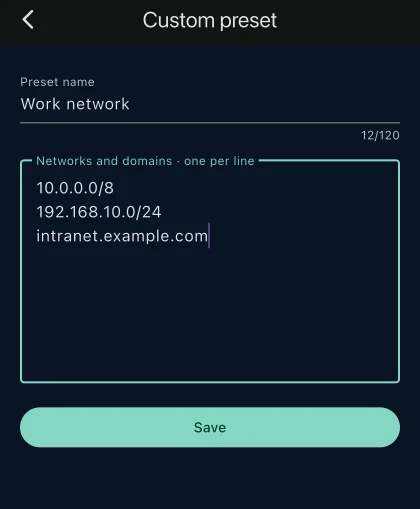 Or build your own preset from networks in CIDR form and domain names.
What you need
- A current MeduzaVPN app. Split tunneling is in the app now; if a VPN's settings show no “Split tunneling” switch, update the app.
- Two or more active VPNs, if you want traffic to leave from different countries. Routes can only point at locations you already own.
- The MeduzaVPN app, on the VPN whose settings you open: Split tunneling is switched on per location, then “Configure routes”.
- A reconnect after saving. Saving ends the affected active connection, so connect to the entry VPN again to start using the new routes.
If a location a route points at stops being available, that route is marked unavailable and you can pick another one. Routes and presets are stored on your account, so the set you build follows you to your other devices.
Split tunneling questions answered
What is split tunneling in MeduzaVPN?
It lets one VPN connection serve several destinations. You connect to a single entry location, and rules decide where each kind of traffic leaves from: another VPN you own, or straight to the internet with no VPN at all. Everything you have not written a rule for follows the “Others” route.
Do I need more than one VPN?
To send traffic out of different countries, yes — a route can only point at a location you already own, so you need at least two. With a single VPN you can still use split tunneling to send chosen traffic Direct, past the VPN, which is what people usually want for banking or work systems that reject foreign addresses.
Why does the order of rules matter?
Routes are checked from top to bottom and the first match wins, and region presets overlap with country ones. Europe, for example, includes Russia. If you want Russian traffic to take a different exit from the rest of Europe, the Russia rule has to be above the Europe rule, otherwise Europe matches first.
How are country presets built?
From registered network prefixes — the IPv4 and IPv6 ranges allocated to each country, which is why the app shows a prefix count next to every one. Registration says who a network belongs to, and that is not always where a site physically sits, so a service hosted elsewhere may not match its country preset.
Can I route something the country list does not cover?
Yes — create a custom preset. Give it a name and list your own networks in CIDR form and domain names, one per line, up to 4096 entries. Saved presets can be edited later, including ones you have not attached to any route yet.
What happens when I save?
Saving ends the affected active connection, because the routing of the tunnel itself changes. Connect to the entry VPN again and the new routes apply. Your routes and presets live on your account rather than on one device.
Route your traffic the way you want
Add a second location and decide, country by country, where your traffic leaves from.